Compressor
Node Preview
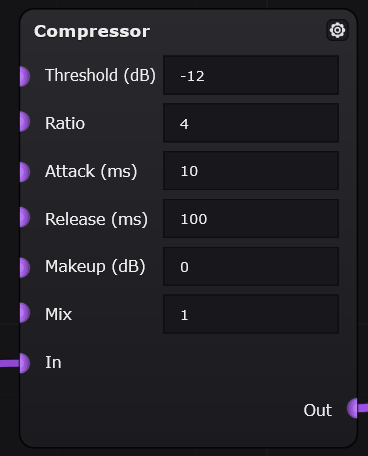
Path: FX > Dynamics > Compressor
Overview
The Compressor node reduces the dynamic range of an incoming audio signal. It lowers the volume of louder parts of the signal once they pass a selected threshold, making the output more even and controlled.
Common Uses
The Compressor node can be used to:
- Even out volume changes in an input signal
- Reduce loud peaks before they reach later effects
- Add sustain to guitar, bass, synth, or vocal-style sounds
- Make distortion respond more consistently
- Control the dynamics of a patch before reverb, delay, or filtering
Parameters
| Parameter | Unit | Range | Description | Practical Effect |
|---|---|---|---|---|
| Threshold | dB | -60 to 0 dB | Sets the signal level where compression begins. Audio above this level is reduced. | Lower threshold values cause more of the signal to be compressed. Higher values affect only louder peaks. |
| Ratio | Ratio | 1 to 20 | Sets how strongly the signal is reduced after passing the threshold. | Higher ratios create stronger compression. Lower ratios sound more natural and subtle. |
| Attack | ms | 0.1 to 1000 ms | Controls how quickly the compressor reacts after the signal rises above the threshold. | Short attack times catch peaks quickly. Longer attack times preserve more of the initial transient or “punch.” |
| Release | ms | 1 to 2000 ms | Controls how quickly the compressor stops reducing gain after the signal falls below the threshold. | Short release times respond quickly but may sound jumpy or cause pumping. Longer release times sound smoother. |
| Makeup | dB | -24 to +24 dB | Adds or reduces gain after compression. | Raises or lowers the output level after compression has been applied. Positive values make the output louder; negative values make it quieter. |
| Mix | Amount / blend | 0 to 1 | Blends between the dry, uncompressed signal and the wet, compressed signal. | 0 outputs only the dry signal, 1 outputs only the compressed signal, and values between 0 and 1 blend the two. |
Parameter Behavior
The Threshold and Ratio controls work together to determine how much compression occurs. The threshold decides when compression starts, while the ratio decides how strongly the signal is reduced after crossing that threshold.
The Attack and Release controls affect the feel of the compression. A fast attack can make the signal smoother and more controlled, but it may also remove some initial punch. A slower attack allows the beginning of the sound to pass through before compression takes effect.
The Makeup control is useful because compression often makes the output quieter. After reducing loud peaks, makeup gain can raise the overall level back up.
The Mix control lets you choose how much of the compressed sound you hear compared to the original sound. At lower Mix values, more of the original signal comes through, so the effect sounds more natural. At higher Mix values, you hear more of the compressed signal, which can make the sound feel smoother, thicker, and more controlled.
Placement
A Compressor is usually placed near the beginning or middle of a patch, depending on the desired effect.
| Example Placement | Result |
|---|---|
| Before distortion | Makes the distortion respond more evenly and can add sustain. |
| After distortion | Controls volume spikes caused by distortion. |
| Before a filter | Makes the filter movement more consistent. |
| Before reverb or delay | Sends a more controlled signal into time-based effects. |
| After reverb or delay | Compresses the reverb or delay tail, which may sound less natural but can create a more dramatic effect. |
Example Settings
These settings are starting points and may need adjustment depending on the input signal.
| Use Case | Suggested Settings |
|---|---|
| Gentle leveling | Threshold: -12 dB, Ratio: 2, Attack: 20 ms, Release: 150 ms, Makeup: 0 dB, Mix: 1 |
| Strong sustain | Threshold: -18 dB, Ratio: 4, Attack: 10 ms, Release: 200 ms, Makeup: 2–4 dB, Mix: 1 |
| Peak control | Threshold: -8 dB, Ratio: 6, Attack: 2–5 ms, Release: 100 ms, Makeup: 0 dB, Mix: 1 |
Tips
- Lower the threshold if the compressor does not seem to affect the sound.
- Increase the ratio for stronger compression.
- Use a slower attack if the sound loses too much punch.
- Use makeup gain if the compressed signal becomes too quiet.
- Lower the mix value if the compression sounds too obvious or unnatural.
- Try placing the compressor before distortion for a smoother, more consistent distorted tone.
Troubleshooting
| Problem | Possible Cause | Fix |
|---|---|---|
| The node does not seem to change the sound | Threshold may be too high | Lower the threshold |
| The output is too quiet | Compression is reducing the signal level | Increase makeup gain |
| The sound feels flat or lifeless | Attack may be too fast, or ratio may be too high | Increase attack or lower ratio |
| The volume seems to pump unnaturally | Release may be too short, or compression may be too strong | Increase release, raise threshold, or lower ratio |
| The sound is too heavily compressed | Threshold is too low or ratio is too high | Raise threshold or reduce ratio |