Noise Gate Node
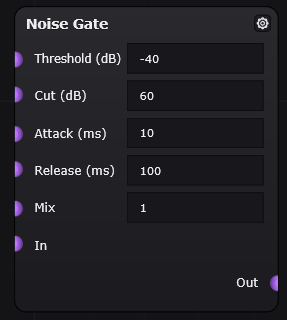
Path: FX > Dynamics > Noise Gate
Overview
The Noise Gate node reduces or cuts the signal when it falls below a selected volume level. It is commonly used to remove unwanted background noise, hum, hiss, or quiet sounds that should not be heard when the main signal is not playing.
When the signal is loud enough, the gate stays open and lets the sound through. When the signal becomes too quiet, the gate closes and reduces the sound.
Common Uses
The Noise Gate node can be used to:
- Reduce background noise when the input signal is quiet
- Clean up unwanted hum, hiss, or room noise
- Tighten guitar, bass, or synth sounds
- Create sharp, choppy, or rhythmic cutoff effects
- Stop quiet unwanted sounds from reaching later effects like distortion or reverb
Parameters
| Parameter | Unit | Range | Description | Practical Effect |
|---|---|---|---|---|
| Threshold | dB | -80 to 0 dB | Sets the volume level where the gate opens or closes. Signals below this level are reduced. | Higher threshold values make the gate close more easily. Lower threshold values allow quieter sounds to pass through. |
| Cut | dB | 0 to 80 dB | Sets how much the signal is reduced when it falls below the threshold. | Higher Cut values make quiet parts much quieter. A value of 0 dB means the gate does not reduce the quiet signal. |
| Attack | ms | 0.1 to 1000 ms | Controls how quickly the gate opens after the signal rises above the threshold. | Short attack times let the sound through almost immediately. Longer attack times create a slower fade-in. |
| Release | ms | 1 to 2000 ms | Controls how quickly the gate closes after the signal falls below the threshold. | Short release times cut off the sound quickly. Longer release times make the sound fade out more smoothly. |
| Mix | Amount / blend | 0 to 1 | Blends between the dry, original signal and the wet, gated signal. | 0 outputs only the original signal, 1 outputs only the gated signal, and values between 0 and 1 blend the two. |
Parameter Behavior
The Threshold control decides how loud the input needs to be before the gate lets it through. If the threshold is set too high, quieter notes or softer parts may get cut off. If the threshold is set too low, background noise may still pass through.
The Cut control decides how much the sound is reduced when the gate closes. A high Cut value makes the quiet parts much quieter, which can help remove noise. A lower Cut value keeps some of the quiet signal, which can sound more natural.
The Attack control changes how quickly the sound comes in after the gate opens. A fast attack keeps the beginning of the sound sharp and immediate. A slower attack can make the sound fade in, but it may also remove some of the first part of a note.
The Release control changes how quickly the sound fades out after the gate closes. A fast release can make the signal stop very suddenly, which is useful for tight or choppy effects. A slower release makes the sound fade out more gradually, which usually sounds smoother.
The Mix control lets you choose how much of the gated sound you hear compared to the original sound. At lower Mix values, more of the original signal comes through, so the gate effect is less obvious. At higher Mix values, more of the gated signal comes through, so background noise and quiet sounds are reduced more strongly.
Placement
The Noise Gate node is usually placed near the beginning of a patch, especially before effects that can make background noise louder.
| Example Placement | Result |
|---|---|
| Before distortion | Reduces hum or noise before distortion makes it louder. |
| After distortion | Cuts off noise created or amplified by distortion. This can sound more aggressive. |
| Before reverb or delay | Prevents background noise from being echoed or spread out. |
| After reverb or delay | Can abruptly cut off reverb or delay tails, which may sound unnatural but can be used creatively. |
| Before compressor | Removes quiet noise before compression makes it more noticeable. |
Example Settings
These settings are starting points and may need adjustment depending on the input signal.
| Use Case | Suggested Settings |
|---|---|
| Gentle cleanup | Threshold: -50 dB, Cut: 20–30 dB, Attack: 10 ms, Release: 150 ms, Mix: 1 |
| Strong noise removal | Threshold: -40 dB, Cut: 60 dB, Attack: 5–10 ms, Release: 100 ms, Mix: 1 |
| Tight rhythmic cutoff | Threshold: -30 dB, Cut: 60 dB, Attack: 1–5 ms, Release: 30–80 ms, Mix: 1 |
| Smoother gate | Threshold: -45 dB, Cut: 30–40 dB, Attack: 10–20 ms, Release: 200–400 ms, Mix: 1 |
Troubleshooting
| Problem | Possible Cause | Fix |
|---|---|---|
| Quiet notes are being cut off | Threshold is too high | Lower the threshold |
| Background noise is still audible | Threshold is too low or Cut is too low | Raise the threshold or increase Cut |
| The start of the sound is missing | Attack is too slow | Lower the attack time |
| The sound cuts off too suddenly | Release is too fast | Increase the release time |
| The gate effect is too obvious | Cut is too high or Mix is too high | Lower Cut or reduce Mix |
| Reverb or delay tails disappear | Gate is placed after reverb or delay | Move the gate earlier in the signal chain |